The Workload Manager (WLM) is a core component of z/OS that continuously balances workloads and system resources to ensure that business goals are met. Its decisions are guided by the policies defined in the WLM Service Definition. The business environments evolve quickly: new workloads, applications, and configuration changes reshape system demands. With all this progress, it’s essential to revisit your WLM policies to make sure they still ensure optimal system performance.
When was the last time you dug into your WLM policy? You probably can’t recall.
Well, it’s time to change that! Welcome to the z/OSMF WLM Policy Advisor guide, where we’ll show you how to get started and how to access policy recommendations in just a few clicks.
The WLM Policy Advisor is a tool designed to enable in-depth exploration of your WLM policy and help z/OS system administrators optimize the performance of workloads. By analyzing system performance data and workload characteristics, Policy Advisor offers insights into best practices for policy configuration and supports new-to-Z professionals with recommendations and suggestions.
Key Features of WLM Policy Advisor
- Detailed policy analysis for proactive problem identification
- Performance data visualizations for deeper understanding of WLM policy configuration
- Recommendations for WLM policy improvements
Getting Started
You can begin working with WLM Policy Advisor right away: it is available with z/OS 3.1 and z/OS 3.2. The solution requires no additional installation or configuration. With just a few clicks, you can unlock a clearer understanding of your policy configuration and performance.
WLM Policy Advisor is an extension of the z/OSMF Workload Management plug-in and can be invoked in the following way:
Step 1: Add the z/OSMF Workload Management plug-in — select either Service Definitions or Policy Advisor.
Step 2: Select a WLM service definition and click Open Policy Advisor.
Step 3: Upload performance data.
To analyze how well your policy meets the needs of your z/OS system, WLM Policy Advisor requires performance data as input. Follow the SMF loading workflow to load SMF 72.3 data, select a service policy, systems, and dates to view.
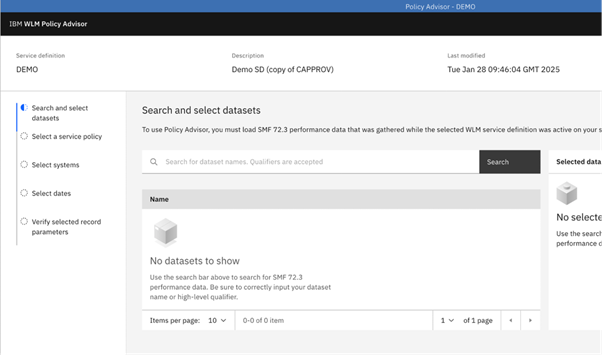
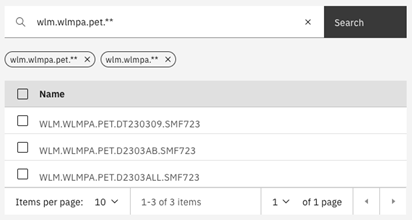
With z/OS 3.2 you can search for datasets using name patterns, and your search history is saved for quicker access.
Analysis
Once the performance data (SMF 72.3) is loaded, you can explore insights about your WLM policy through three dedicated panels:
- Overview
- Performance Index
- Importance
In this section, we’ll explore how each of these panels can help you better understand your WLM policy.
Overview Panel
After the SMF 72.3 data has been successfully loaded, the Overview Panel opens automatically.
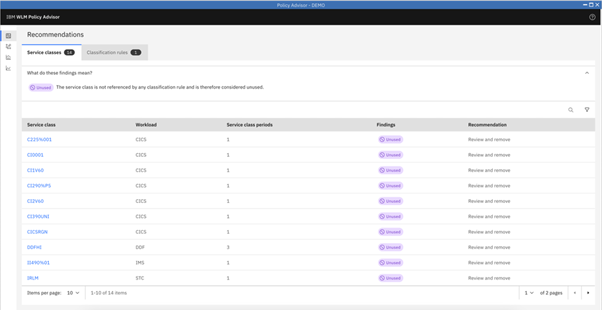
Clicking on the Service class name, shown above, allows you to view additional attributes, classification rules, and recommendations of a service class.
The classification rules tab provides you with various best practice checks. For example:
- no default service class defined for a subsystem
- workload is running in default service class SYSOTHER
Performance Index Panel
Performance Index (PI) is a key metric used to evaluate how well service classes meet their defined goals. When reviewing PI values for your service classes, use the following guidelines:
- PI < 0.8 – Goal overachieved
- 0.8 ≤ PI ≤ 1.2 – Goal met
- PI > 1.2 – Goal missed
In general, you should expect the PI to fall between 0.8 and 1.2. If a service class consistently shows PI values outside this range (always overachieving or always missing), it may indicate the need for tuning.
WLM Policy Advisor supports analyzing service classes by providing a heatmap, along with filtering and sorting options. Below we can see that many service classes defined in the policy are not meeting their goals. This serves as an indicator for a more detailed analysis and policy adjustment.
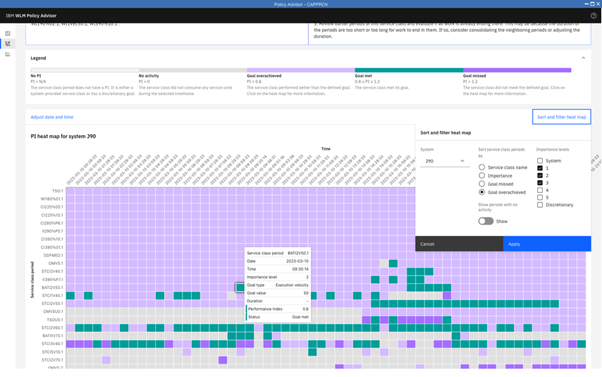
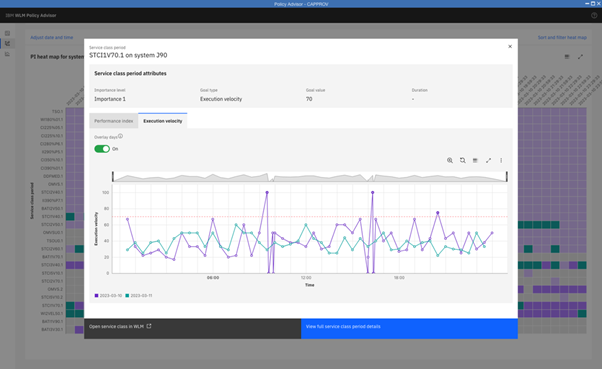
In some cases, it’s important to extend the analysis beyond a single day and compare results across multiple days to confirm whether the observed pattern is consistent. The example below shows an overlay of two days: 2023-03-10 and 2023-03-11. As you can see, 2023-03-10 deviates noticeably from 2023-03-11. This suggests that including additional days in the analysis may provide better insights.
Importance Panel
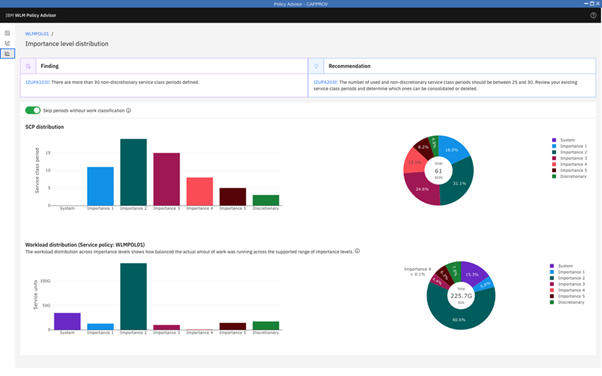
The Importance Panel gives you a clear overview of how service class periods are distributed across importance levels. To evaluate whether the policy ensures a balanced workload distribution, it’s essential to examine how work is spread across these levels.
In the example below, most of the workload runs within Importance 2. This imbalance suggests that the policy definition should be revisited. When the majority of work falls under a single importance level, WLM loses flexibility in prioritizing jobs effectively, which can reduce overall efficiency.
Final Points
WLM Policy Advisor makes policy analysis easier. By joining the growing community of users, you gain access to in-depth insights and actionable recommendations that help you improve workload management. Learn more about WLM Policy Advisor on our website. Have ideas for improving WLM Policy Advisor? Share them through the IBM Ideas Portal.
Learn more about WLM Policy Advisor at SHARE'd Knowledge.
Anastasiia Didkovska holds a master’s degree in computational linguistics from the University of Tübingen. She began her career in the Workload Management (WLM) development team at IBM Germany. Currently, she is the product manager for AI on z/OS. Anastasiia is passionate about bringing new products to market that help people overcome obstacles and enhance their systems' resilience. During her time at IBM, she has worked on workload utilization prediction, anomaly detection, Flexible Capacity for Cyber Resiliency, and AI integration into z/OS.
Simon Flaig started at IBM in 2021 as a Software Developer for z/OS Workload Management. Today, he is the development lead for z/OSMF WLM Policy Advisor which was first released with z/OS 3.1. He regularly presents the z/OSMF WLM Policy Advisor and z/OS WLM topics at conferences and customer events. Simon holds a bachelor's degree in computer science.
Iris Rivera is design lead and senior design researcher responsible for AI for IBM Z. Iris earned a bachelor’s degree in information technology with a concentration in human-computer interaction from Rensselaer Polytechnic Institute. Ms. Rivera has specialized in user-centered design for the last 21 years at IBM and is committed to understanding and advocating for her users to design solutions to address their needs. She is a co-founder of zNextGen at SHARE, a user-driven networking community for new and emerging mainframe professionals.