This article is part of SHARE’s intro to the mainframe series. Read the articles on CICS, Automation, Catalogs, HSLAM, COBOL, Db2, and OpenTelemetry. If you would like to contribute to this series, please reach out to editor@share.org.
In z/OS, UNIX file systems are essential. They hold much of what your system and applications need, including programs, configuration files, logs, and user data.
The primary UNIX file system in z/OS is zFS, which stands for z/OS File System. zFS is designed specifically for z/OS UNIX System Services. It manages files, directories, and access in a hierarchical structure, much like a native UNIX or Linux file system. It replaces older systems like HFS and is the standard for modern z/OS environments. If you are working with z/OS, you are almost certainly using zFS.
zFS file systems can be mounted into the z/OS UNIX hierarchy along with other local (or remote) types of file systems, such as Temporary File System(TFS) or Network File System(NFS). zFS can be used for all levels of the z/OS UNIX System Services hierarchy, including the root file system. But beyond that basic role, zFS was created to address real limitations that existed in earlier file systems, especially in the areas of performance, scalability, and reliability.
What zFS Is and How It Works
zFS is a UNIX-style file system that organizes data into a tree structure of files and directories. At the top of this tree is the root directory, written as “/”. From there, directories branch out into paths like /u, /etc, /usr, and so on.
If you are accustomed to working with Linux or UNIX, this structure will feel familiar.
However, zFS is different from traditional z/OS data sets. Instead of being record-based, it is byte-oriented. zFS stores data as a byte stream, which is a more flexible format for modern applications. It also means that applications (and application programmers) do not have to worry about record formats.
zFS file systems are built on VSAM linear data sets. The data set that contains a zFS file system is also called a zFS aggregate. The aggregate holds the file data, metadata, and logs. You don’t usually interact with aggregates, but you should know they are part of the internal organizational structure of the zFS. The use of aggregates helps zFS perform well and recover from problems.
Why zFS Is Important for z/OS
zFS was designed to address the limitations of older file systems and support modern workloads:
- Fast and scalable. zFS can handle large numbers of files and large directories without slowing down. This matters in enterprise environments where systems manage huge amounts of data.
- Advanced caching. This improves performance by keeping frequently used data in memory, so that the system does not have to read it from disk every time.
- Dynamic resizing. In the past, expanding file systems could require downtime or major changes. With zFS, you can adjust the file system size more easily, which makes system management easier.
How Access Control Works in zFS
zFS provides UNIX permissions. Each file and directory has an owner, a group, and permissions for users. Permissions control who can read, write, or execute a file, integrated with an enterprise security manager, such as RACF.
zFS supports access control lists or ACLs. These allow you more granular control by granting specific users or groups different levels of access. ACLs are useful when standard permissions are not enough.
Besides UNIX permissions, a zFS can be further protected by a security class, which is called FSACCESS in RACF. Your security administrator can use this class to permit or restrict access to a zFS file system. Eligible users are then subject to the usual authorization checking first, before checking for ownership, permission bits, and ACLs. This type of access works at the file system level, rather than the file level.
In summary:
- File permissions and ACLs control what you can do inside a file system
- FSACCESS controls whether you can even enter that file system.
zFS in a Sysplex Environment
A key feature of zFS is its ability to work across a sysplex, the clustering technology available on z/OS. When you enable shared file systems in a sysplex, multiple systems can access the same zFS data at the same time.
To enable a shared file system environment, several zFS file systems are carefully structured to serve a specific purpose, as follows:
- A sysplex root file system provides a shared view and is usually read-only
- A version file system contains system binaries like /bin and /usr
- Each system has its own system-specific file system for directories like /etc, /tmp, and /var
- A shared /global directory can hold data that all systems need.
This design allows systems to share important data while still keeping some data local.
The zFS Ownership Model in a Shared File System Environment
zFS has its own concept of file system ownership. Even though multiple z/OS systems can access a zFS file system, only one z/OS system acts as owner — the zFS file system owner — at any given time. This is typically the system where the file system is first mounted in a sysplex-aware environment.
The owner is responsible for:
- Coordinating updates to the file system
- Managing metadata
- Controlling locking to keep data consistent.
This setup helps maintain performance while ensuring that data remains accurate and consistent.
High Availability in a Shared File System Environment
A key advantage of zFS in a sysplex is its high availability. Because multiple systems can access the same data, the file system does not depend on just one system. If something goes wrong, another system can take over.
To help keep applications available, the AUTOMOVE function (a parameter on the MOUNT statement) allows ownership of a file system to move from one system to another automatically in the event of a failure. This reduces downtime and keeps z/OS applications running.
Configuration for a Shared File System Environment
To use sysplex features and the AUTOMOVE function, you configure them in the BPXPRMxx parmlib member, for example:
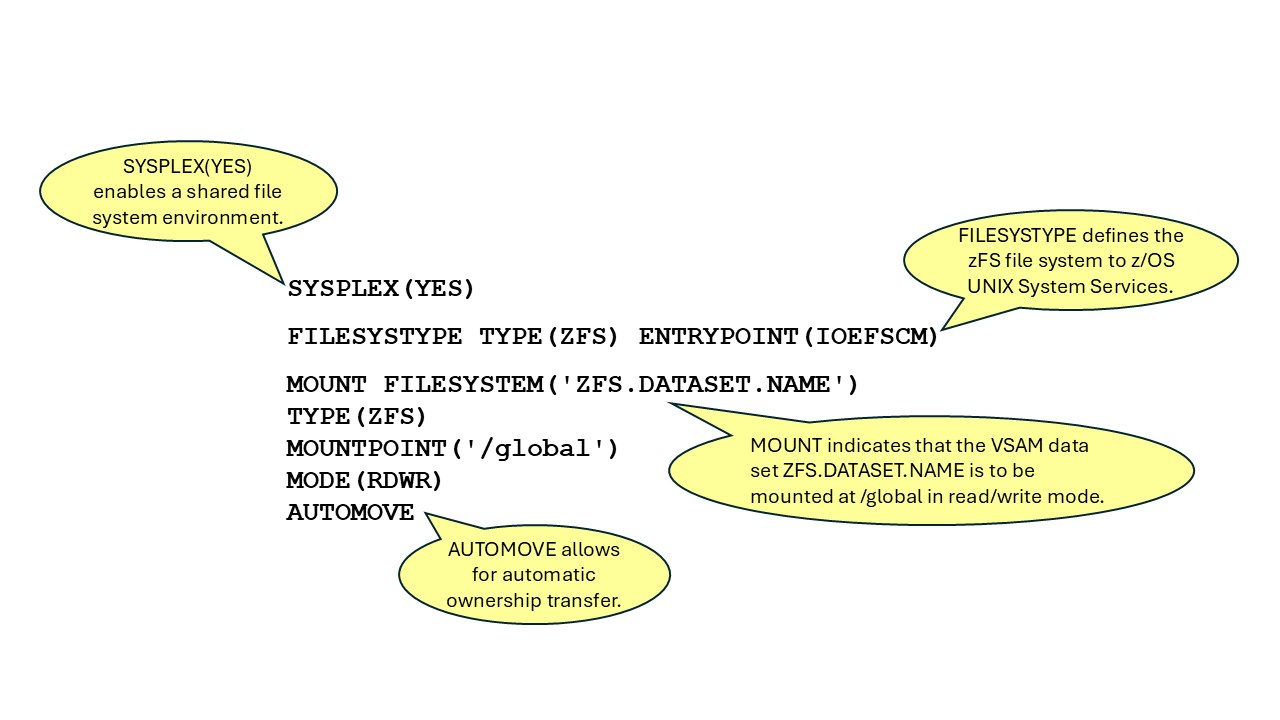
These settings are critical for building a highly available system.
Simplicity and Reliability
zFS is a core part of how z/OS UNIX works.
It provides:
- A familiar UNIX-style file system
- Strong security through permissions, ACLs, and external security managers
- High performance and scalability
- Shared access across multiple systems
- Built-in high availability
zFS combines the simplicity of UNIX with the strength and reliability of the z/OS platform. It allows systems to share data, stay available during failures, and handle large workloads efficiently.
It is not just another file system. It is the foundation for everything built on z/OS UNIX.
Find Out More
For more information, see the topic “Using the z/OS File System (zFS)” in the IBM publication, z/OS UNIX System Services Planning. Also, see z/OS File System Administration.
Learn more at SHARE'd Knowledge.
Acknowledgement
With gratitude to Kershaw Mehta, IBM senior technical staff member, z/OS UNIX Technologies, for his insights and review during the creation of this article.
 Wayne O'Brien is a content developer at IBM, specializing in documentation for IBM Z security products. He has written extensively about computer security, z/OS installation and upgrades, and the IBM z/OS Management Facility (z/OSMF). Wayne holds a Master of Science degree in Technical Communications from Rensselaer Polytechnic Institute (RPI) in Troy, New York.